Translate

Wednesday, April 24, 2013

7 distribusi Linux terbaik untuk anda


The 2013 Top 7 Best Linux Distributions for You


There have been several shifts and shakeups on the lists presented since then, of course, and -– as you'll soon see – this year's offering holds true to that pattern. In fact, I think it's safe to say that the past year has seen so much upheaval in the desktop world – particularly where desktop environments are concerned – that 2013's list could come as a surprise to some.
Let me hasten to note that the evaluations made here are nothing if not subjective. There also is no such thing as the “one best” Linux distro for anything; in fact, much of the beauty of Linux is its diversity and the fact that it can be tweaked and customized for virtually any taste or purpose. The one best Linux for you, in other words, is the flavor you choose for your purpose and preference and then tweak until it feels just right.
Still, I think some Linux flavors stand out these days as leaders for particular use cases. I'm going to diverge a bit from past lists here when it comes to those categories, however. Specifically, where past lists have included the category “Best Linux LiveCD,” I think that's become almost obsolete given not just the general shift to USBs -- some PCs don't even come with CD drives anymore, in fact -- but also the fact that most any Linux distro can be formatted into bootable form.
On the other hand, with the arrival of Steam for Linux, I think this year has brought the need for a new category: Best Linux for Gaming.
Read on, then, for a rundown of some of the best of what the Linux world has to offer.

Best Desktop Distribution

There are so many excellent contenders for desktop Linux this year that it's become a more difficult choice than ever – and that's really saying something.
Canonical's Ubuntu has made great strides in advancing Linux's visibility in the public eye, of course, while Linux Mint and Fedora are both also very strong choices. Regarding Ubuntu, however, a number of issues have come up over the past year or so, including the inclusion of online shopping results in searches – an addition Richard Stallman and the EFF have called “spyware.”

Fuduntu logo
At the same time, the upheaval caused by the introduction of mobile-inspired desktops such as Unity and GNOME 3 continues unabated, spurring the launch of more classically minded new desktops such as MATE and Cinnamon along with brand-new distros.
For best desktop Linux distro, I have to go with Fuduntu, one of this new breed of up-and-comers. Originally based on Fedora but later forked, Fuduntu offers a classic GNOME 2 interface – developed for the desktop, not for mobile devices -- and generally seems to get everything right.
Besides delivering the classic desktop so many Linux users have made clear that they prefer, Fuduntu enjoys all the advantages of being a rolling release distribution, and its repository includes key packages such as Netflix and Steam. I've been using it for months now and haven't seen a single reason to switch.

Best Laptop Distribution

At the risk of sounding repetitive, I have to go with Fuduntu for best Linux distro as well. In fact, the distro is optimized for mobile computing on laptops and netbooks, including tools to help achieve maximum battery life when untethered. Users can see battery life improvements of 30 percent or more over other Linux distributions, the distro's developers say.
Such optimizations combined with this solid and classic distro make for a winner on portable devices as well.

Best Enterprise Desktop Linux

Red-Hat-logo-smThe enterprise is one context in which I have to agree with recent years' evaluations, and that includes the enterprise desktop.
While SUSE Linux Enterprise Desktop is surely RHEL's primary competitor, I think Red Hat Enterprise Linux is the clear leader in this area, with just the right combination of security, interoperability, productivity applications and management features. 

Best Enterprise Server Linux

It's a similar situation on the server. While there's no denying SUSE Linux Enterprise Server has its advantages, Red Hat is pushing ahead in exciting new ways. Particularly notable about Red Hat this year, for example, is its new focus on Big Data and the hybrid cloud, bringing a fresh new world of possibilities to its customers.

BackTrack logoBest Security-Enhanced Distribution

Security, of course, is one of the areas in which Linux really stands out from its proprietary competitors, due not just to the nature of Linux itself but also to the availability of several security-focused Linux distributions. 
Lightweight Portable Security is one relatively new contender that emerged back in 2011, and BackBox is another popular Ubuntu-based contender, but I still have to give my vote to BackTrack Linux, the heavyweight in this area whose penetration testing framework is used by the security community all over the world. Others surely have their advantages, but BackTrack is still the one to beat.

archlinux logoBest Multimedia Distribution

Ubuntu Studio has often been named the best distro for multimedia purposes in Linux.com's lists, but it's by no means the only contender. ZevenOS, for instance, is an interesting BeOS-flavored contender that came out with a major update last year.
For sheer power and nimble performance, though, this year's nod goes to Arch Linux. With an active community and thousands of software packages available in its repositories, Arch stays out of the way so your PC can focus on the CPU-intensive tasks at hand.

Best Gaming Distribution

UbuntuLogoLast but certainly not least is the gaming category, which surely represents one of the biggest developments in the Linux world over this past year. While it may not be relevant for enterprise audiences, gaming has long been held up as a key reason many users have stayed with Windows, so Valve's decision to bring its Steam gaming platform to Linux is nothing if not significant.
The Linux distro choice here? That would have to beUbuntu, which is specifically promoted by the Valve team itself. “Best experienced on Ubuntu” reads the tag line that accompanied the Steam for Linux release last month, in fact. Bottom line: If you're into gaming, Ubuntu Linux is the way to go.
Have a different view on any of these categories? Please share your thoughts in the comments.

Revolusi konsumen, masa depan periklanan digital..


Salesforce's Benioff maps out 'the Customer Revolution'

Summary: Salesforce's leader unveils the latest addition to the Marketing Cloud while sharing his thoughts on the future of digital advertising.


benioffdreamforce

SAN FRANCISCO -- Salesforce.com (and its customer base) are on the cusp of a major shift in their collective mission, according to CEO Marc Benioff.
For anyone following the business technology industry closely already, the "Internet of Everything" topic is quite familiar.
It was this same concept that had Benioff buzzing at the CRM and cloud giant’s customer and media event at the Palace Hotel on Tuesday morning.
"My car is on the network. My refrigerator is on the network. My camera is on the network," Benioff quipped.
"My car is on the network. My refrigerator is on the network. My camera is on the network," Benioff quipped, pushing that the :Internet of Everything" is changing both our personal lives and the way we work.
In the same vein as the "social enterprise" and "social revolution," Benioff suggested a new catchy moniker for this latest technological shift: "The Customer Revolution."
For Salesforce, this new era has come about thanks to seven changes: Social, mobile, big data, community, apps, cloud, and trust.
"This incredible new world is on the mind of all of our customers," Benioff said, "This is the conversation that everyone wants to have."
For instance, Benioff cited an IDC report that projects big data to enable 450 billion business transactions per day by 2020.
"What if my jet engine could talk to me, and what would it say?" Comstock asked.
General Electric chief marketing officer Beth Comstock followed up, remarking in a video clip that social is not only helping connect employees and customers, but also customers and employees to machines.
"What if my jet engine could talk to me, and what would it say?" Comstock asked, hinting that social and big data working together could answer questions never thought possible.
But at the end of the day, Benioff suggested that the technology changes don't matter as much in the face of the last one on that list: customer trust.
The general idea of Salesforce’s event on Tuesday was to preach to its clientele that this “Customer Revolution” means that they need to rethink business models from the customer perspective.
In order to become a customer-centric (or even “customer-obsessed”) company, Benioff said that decision makers need to answer the following five questions:
  • How do you market to customers when they are everywhere?
  • How do you service customers when they are everywhere?
  • How do you sell as a team with your customers?
  • How do you build a customer platform?
  • How do you transform the way you work?
Naturally, Benioff answered these questions with a number of products from the Salesforce.com portfolio, including Social.com.
The social ad campaigns publisher is the latest addition to the Marketing Cloud, which debuted at Dreamforce 2012 in September as the fruition of Salesforce's acquisitions of Buddy Media and Radian6.


Ringkasan Pengetahuan Dasar tentang Kebakaran


RINGKASAN PENGETAHUAN DASAR KEBAKARAN

.
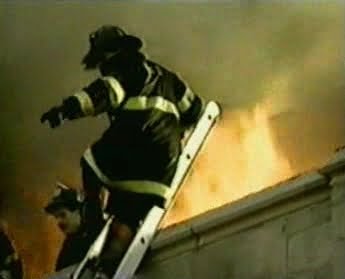
Kebakaran dan ledakan mer
upakan kejadian yang memakan banyak korban di Indonesia, bahkan di dunia sekalipun. Di Amerika pada tahun 2001 telah terjadi 1.734.500 kejadian kebakaran yang melukai 21.100 orang. Kebakaran ini menyebabkan 6.196 orang masyarakat umum dan pekerja serta 82.250 petugas pemadam kebakaran meninggal dunia. Kejadian ini mengakibatkan kerugian sebesar $44.023.000.000. (ABS, 2000)
Selain itu di Indonesia sendiri data yang dikumpulkan oleh Dinas Kebakaran DKI Jakarta sejak tahun 1992-1997 telah terjadi kebakaran sebanyak 4.244 kasus, di mana lebih dari 50% yaitu sekitar 2135 kasus disebabkan oleh konsleting listrik (elektro Indonesia, 1998). 
Kebakaran adalah terjadinya api yang tidak dikehendaki (energi yang tidak terkendali). Menurut Keputusan Menteri Pekerjaan Umum No.10/2000 bahwa bahaya kebakaran diakibatkan oleh adanya ancaman potensial dan derajat terkena percikan api sejak awal terjadi kebakaran hingga penjalaran api, asap dan gas yang ditimbulkan. Untuk mencegah kerugian akibat kebakaran maka penting adanya penanggulangan kebakaran yakni segala daya upaya untuk mencegah dan memberantas kebakaran.
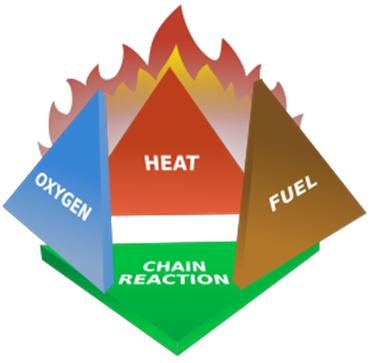
Tetrahedron
Sebelumnya penting kita memahami bahwa Kebakaran bisa dapat terjadi karena reaksi kimia berantai dari 3unsur yakni nyala api (panas), oksigen dan bahan bakar (fuel), reaksi ini disebut dengan Fire Tetrahedron.
.
.
Secar
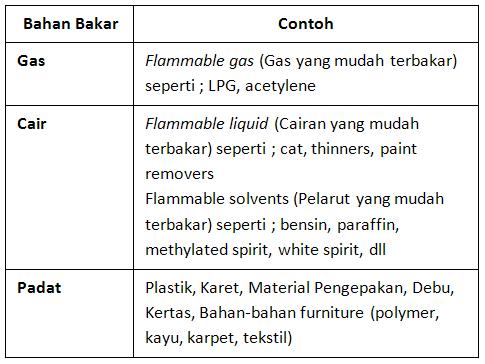
a nasional telah ditetapkan klasifikasi Kebakaran menurut KEPMENAKER NO. PE-04/MEN/1980 Tentang Syarat – Syarat Pemasangan dan Pemeliharaan Alat Pemadam Api Ringan. Sedangkan dalam ranah internasional terdapat lembaga NFPA (National Fire Protection Association)sebagai wadah mengatur dan memberikan pengembangan pada pencegahan kebakaran. Berikut ini Jenis kebakaran yang dikelompokkan berdasarkan jenis bahan bakarnya:
Klasifikasi Kebakaran
Apabila keadaan darurat yakni kebakaran tidak dapat terhindar, maka perlu adanya langkah-langkah penyelamatan terhadap Bahaya Kebakaran (prosedur kebakaran). Berikut ini beberapa alat pemadam kebakaran dan tanda peringatan kebakaran :
.
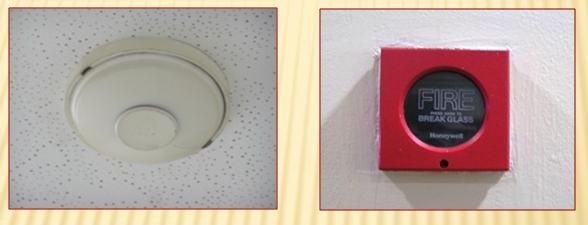
1. Alarm Kebakaran 
Alarm kebakaran adalah komponen yang bertujuan memberikan isyarat adanya kebakaran pada tingkat awal yang dipasang di setiap ruangan dalam bangunan, termasuk ruangan khusus dimana suara-suara dari luar tidak dapat terdengar. Alarm kebakaran berupa:
a. Alarm Kebakaran Audio yang memberikan isyarat berupa bunyi khusus.
b. Alarm kebakaran Visual yang memberikan isyarat yang terlihat jelas, dipasang pada ruangan khusus, seperti pada perawatan orang tuli.
.
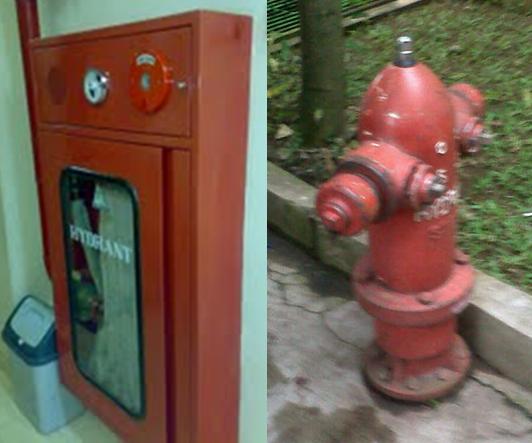
2. Hidran
Hidran adalah salah satu sarana yang digunakan untuk
Hidran
 memadamkan kebakaran dengan bahan utama adalah air. Hidran gedung, yaitu hidran yang teletak di dalam suatu gedung/bangunan dan sistem serta peralatanya disediakan serta dipasang di dalam bangunan/gedung tersebut. Syarat pemasangan hidran gedung antara lain: kotak hidran dipasang dengan ketinggian 75 cm dari permukaan lantai, mudah terlihat, mudah dicapai, tidak terhalang benda lain dan dicat warna merah. Ditengan kotak hidran diberi tulisan ”HIDRAN” dengan warna putih, tulisan minimum 10 cm.
.
3. Alat Pemadam Api Ringan (APAR) 
Alat Pemadam Api Ringan
Alat pemadam api ringan adalah alat yang ringan dan mudah digunakan oleh satu orang untuk memadamkan api pada mula terjadi kebakaran (tahap dini atau awal). Alat pemadam api ringan dapat pula diartikan sebagai alat yang dipergunakan untuk memadamkan api, seringkali pada kondisi darurat dan terdiri dari wadah bertekanan dengan bahan kimia yang dapat memadamkan api. Jenis media yang digunakan untuk memadamkan api adalah sebagai berikut: 
a. Air (water tipe)
b. Tepung Kimia (dry chemical powder)
c. Busa kimia (foam)
d. Gas CO2 (Carbondioxide Extingisher) 
e. Halogen (Halogenated Agent)
.
Bagaimana menggunakan APAR? 
.
4. Pemercik Air (Sprinkler)
Sistem sprinkler lebih dikenal penggunaannya secara otomatis merupakan cara efektif untuk mengendalikan kebakaran. Prinsipnya dari penyemprotan air otomatis dalam keadaan penuh kepadatan adalah untuk memadamkan kebakaran sedini mungkin. Sistem sprinkler akan membunyikan alarm jika air mengalir melalui sistemnya (Depnaker-UNDP-ILO 1987)
.
5. Pencahayaan Darurat
Pencahayaan darurat dimaksudkan untuk menyediakan penerangan yang memadai pada saat penerangan utama tidak berfungsi ketika terjadi peristiwa kebakaran. Pencahayaan darurat menggunakan sumber daya listrik darurat yang bekerja secara otomatis.
.
6. Tanda Petunjuk Arah
Bila arah menuju
 keluar tidak dapat terlihat langsung dengan jelas oleh penghuni atau pengguna bangunan maka harus dipasang tanda petunjuk dengan tanda panah papan menunjukkan arah.Dipasang di koridor, jalan menuju ruang besar dan semacamnya yang memberikan indikasi penunjuk arah keluar. Setiap tanda petunjuk arah harus memenuhi syarat yakni jelas dan pasti, diberi pencahayaan cukup dan dipasang sedemikian rupa sehingga bila terjadi gangguan listrik, maka pencahayaan darurat segera menggantikannya.
Ketika anda melihat awal kebakaran, segera cari bantuan atau Berteriaklah : Kebakaran! Kebakaran! Kebakaran!… Penting untuk anda menghafal nomor telepon darurat pemadam kebakaran. Jika asap sudah memenuhi ruangan, lakukan gerakanMenundukkan badan untuk menghindari asap dan gas. Merangkak jika perlu, udara yang terbaik berada dekat lantai JANGAN mengunci pintu atau jalan keluar. Ingat yang terpenting dari segalanya adalah anda menyelamatkan nyawa. (red: fhutasoit)
.
Ref:
U.S. Fire Administration (2004) A Profile of Fire in the US 1992-2001, Maryland, Federal Emergency Management Agency
NFPA (1991) National Fire Codes, Massachusetts, NFPA
Intenational Labour Organization. 1989. Buku Pedoman Pencegahan Kecelakaan. Geneva: Pustaka Binaman Pressindo
2. Hidran
Hidran adalah salah satu sarana yang digunakan untuk
memadamkan kebakaran dengan bahan utama adalah air. Hidran gedung, yaitu hidran yang teletak di dalam suatu gedung/bangunan dan sistem serta peralatanya disediakan serta dipasang di dalam bangunan/gedung tersebut. Syarat pemasangan hidran gedung antara lain: kotak hidran dipasang dengan ketinggian 75 cm dari permukaan lantai, mudah terlihat, mudah dicapai, tidak terhalang benda lain dan dicat warna merah. Ditengan kotak hidran diberi tulisan ”HIDRAN” dengan warna putih, tulisan minimum 10 cm.
3. Alat Pemadam Api Ringan (APAR)
Alat pemadam api ringan adalah alat yang ringan dan mudah digunakan oleh satu orang untuk memadamkan api pada mula terjadi kebakaran (tahap dini atau awal). Alat pemadam api ringan dapat pula diartikan sebagai alat yang dipergunakan untuk memadamkan api, seringkali pada kondisi darurat dan terdiri dari wadah bertekanan dengan bahan kimia yang dapat memadamkan api. Jenis media yang digunakan untuk memadamkan api adalah sebagai berikut:
a. Air(water tipe)
b. Tepung Kimia(dry chemical powder)
c. Busa kimia(foam)
d. Gas CO2(Carbondioxide Extingisher)
e. Halogen(Halogenated Agent)
Bagaimana menggunakan APAR?

Tuesday, April 23, 2013

OpenFlow, lebih dalam.


OpenFlow protocol primer: Looking under the hood

David B. Jacobs, Contributor
OpenFlow, a switching technology that began in 2008 as a Stanford University research project, is now gathering a lot of interest from network device vendors and managers of large switched networks. With the OpenFlow protocol, a form of software-defined networking, a network can be managed as a whole rather than as a number of individual devices.
Traditional switches use Spanning Tree or newer standards such as Transparent Interconnection of Lots of Links (TRILL) to determine how to forward packets. OpenFlow moves the forwarding decision from individual switches to a controller, typically a server or workstation.
A management application executing on the controller interfaces to all of the switches in the network, making it possible to configure forwarding paths that utilize all available bandwidth. By interfacing to cloud management software, the application can guarantee that bandwidth is in place as workloads are created or moved.
OpenFlow protocol operations
The OpenFlow specification defines a protocol between the controller and the switches and a set of operations on the switches. The controller-to-switch protocol runs over either Transport Layer Security (TLS) or an unprotected TCP connection. Commands from the controller to the switch specify how packets are to be forwarded and configures parameters such as VLAN priorities. Messages from switches inform the controller when links go down or when a packet arrives with no specified forwarding instructions.

MORE ON OPENFLOW AND SOFTWARE-DEFINED NETWORKING

Private cloud VLAN problems: Is OpenFlow the answer?
The application tier is the meat of a software-defined network architecture
OpenFlow applications work where network management fails
Forwarding instructions are based on a flow, which consists of all packets sharing a common set of characteristics. A large variety of parameters can be specified to define a flow. Possible criteria include the switch port where the packet arrived, the source Ethernet port, source IP port, VLAN tag, destination Ethernet or IP port, and a number of other packet characteristics. The controller specifies to the switch the set of parameters that define each flow and how packets that match the flow should be processed.
Each switch maintains a number of flow tables, with each table containing a list of flow entries. Each flow entry contains a match field that defines the flow, a counter and a set of instructions. Entries in the match field contain either a specific value against which the corresponding parameter in the incoming packet is compared or a value indicating that the entry is not included in this flow’s parameter set.
Flow tables are numbered beginning with table zero, with incoming packets first compared to flow table entries in table zero. When a match is found, the flow counter is incremented and the specified set of instructions is carried out.
A new flow must be created when a packet arrives that does not match any flow table entry. The switch may have been configured to simply drop packets for which no flow has been defined, but in most cases, the packet will be sent to the controller. The controller then defines a new flow for that packet and creates one or more flow table entries. It then sends the entry or entries to the switch to be added to flow tables. Finally, the packet is sent back to the switch to be processed as determined by the newly created flow entries.
Flow table instructions modify the action set associated with each packet. Packets begin processing with an empty action set. Actions can specify that the packet be forwarded through a specified port or modify packet TTL, VLAN, MPLS tags or packet QOS.
Instructions in the first flow table may carry out an action on the packet or add actions to be carried out later. Instructions may also direct packet processing to continue by comparing it to entries in another flow table. A flow entry in a subsequent table may contain instructions that add further actions, delete or modify actions added earlier or carry out actions.
An instruction may also add a value called metadata to a packet before sending it to the next flow table. That value becomes an additional parameter to be matched against the metadata value in flow table entries in the next table. Processing continues table by table until all specified instructions have been completed and the packet has been forwarded.
More SearchNetworking primers
A DevOps primer for network engineers
vSphere vSwitch primer: Design considerations
NVGRE standard primer: More VLANs and isolated tenants in the cloud
VXLAN standard primer: Extended VLANs for long distance VM migration
An instruction may specify a group identifier. Groups provide an efficient way to direct that the same set of actions must be carried out on multiple flows. Group operations are defined within the switch by entries in the group table. Each entry consists of its identifier value, a group type, a counter and a set of action buckets. Group type specifies whether all action buckets should be executed, which is useful for implementing broadcast or multicast, or that only specific buckets are to be executed.
OpenFlow protocol messaging
The protocol consists of three types of messages: controller-to-switch, asynchronous and symmetric.
Controller-to-switch messages are sent by the controller to:
  • Specify, modify or delete flow definitions
  • Request information on switch capabilities
  • Retrieve information like counters from the switch
  • Send a packet back to a switch for processing after a new flow is created
Asynchronous messages are sent by the switch to:
  • Send the controller a packet that does not match an existing flow
  • Inform the controller that a flow has been removed because its time to live parameter or inactivity timer has expired
  • Inform the controller of a change in port status or that an error as occurred on the switch
Symmetric messages can be sent by both the switch or the controller and are used for:
  • Hello messages exchanged between controller and switch on startup
  • Echo messages used to determine the latency of the controller-to-switch connection and to verify that the controller-to-switch connection is still operative
  • Experimenter messages to provide a path for future extensions to OpenFlow technology
OpenFlow protocol development: A promising future
The Open Networking Foundation was founded in 2011 to develop and standardize OpenFlow. Members include Cisco, Facebook, Google, HP, IBM and Juniper Networks.
The current OpenFlow specification, Version 1.1.0, contains a large number of optional features to enable further experimentation, and work is underway on Version 1.2 of the specification.
While Cisco has not announced an OpenFlow-friendly switch, other switch vendors, such as the  IBM and NEC partnership, as well as HP, have implemented OpenFlow in existing products and made these units available for continued development. As vendors and network operators gain further experience with the technology, OpenFlow promises to produce a profound change in the way that networks are managed and operated.
David B. Jacobs of The Jacobs Group has more than twenty years of networking industry experience. He has managed leading-edge software development projects and consulted to Fortune 500 companies as well as software start-ups. 

Membuat VLAN dalam OpenVSwitch - implementasi OpenFlow


Salah satu feature yang banyak dicari untuk memaksimalkan kemampuan suatu switch adalah kemampuan VLAN. OpenVSwitch memilikinya.

VLANs

Topic:
Isolating VM traffic using VLANs
Setup:
Two Physical Networks:
  • Data Network:  Ethernet network for VM data traffic, which will carry VLAN tagged traffic between VMs.  Your physical switch(es) must be capable of forwarding VLAN tagged traffic and the physical switch ports should be VLAN trunks (Usually this is default behavior.  Configuring your physical switching hardware is beyond the scope of this document).
  • Management Network: This network is not strictly required, but it is a simple way to give the physical host an IP address for remote access, since an IP address cannot be assigned directly to eth0.  
Two Physical Hosts:
Host1, Host2.  Both hosts are running Open vSwitch.  Each host has two NICs:
  • eth0 is connected to the Data Network.  No IP address can be assigned on eth0.
  • eth1 is connected to the Management Network (if necessary).   eth1 has an IP address that is used to reach the physical host for management.
Four VMs:
VM1,VM2 run on Host1.  VM3,VM4 run on Host2.
Each VM has a single interface that appears as a Linux device (e.g., “tap0″) on the physical host.  (Note: for Xen/XenServer, VM interfaces appears as Linux devices with names like “vif1.0″)

Goal:
Isolate VMs using VLANs on the Data Network.
VLAN 1: VM1,VM3
VLAN 2: VM2,VM4
Configuration:
Perform the following configuration on Host 1:
Create an OVS bridge:
ovs-vsctl add-br br0
Add eth0 to the bridge (by default, all OVS ports are VLAN trunks, so eth0 will pass all VLANs):
ovs-vsctl add-port br0 eth0
Add VM1 as an “access port” on VLAN 1:
ovs-vsctl add-port br0 tap0 tag=1
Add VM2 on VLAN 2:
ovs-vsctl add-port br0 tap1 tag=2
On Host 2, repeat the same configuration to setup a bridge with eth0 as a trunk:
ovs-vsctl add-br br0
ovs-vsctl add-port br0 eth0
Add VM3 to VLAN 1:
ovs-vsctl add-port br0 tap0 tag=1
Add VM4 to VLAN 2:
ovs-vsctl add-port br0 tap1 tag=2
Trouble-Shooting:
Ping from VM1 to VM3, this should succeed.
Ping from VM2 to VM4, this should succeed.
Ping from VM1/VM3 to VM2/VM4, this should not succeed (unless you have a router configured to forward between the VLANs, in which case, packets arriving at VM3 should have the source MAC address of the router, not of VM1).
If you have problems with this cookbook entry, please send them to the OVS discuss email list.